April 9, 2026BLE / Gateway / App
Bringing a BBQ Thermometer to WiFi via BLE Gateway — with ESP32, MQTT & Home Assistant
ESP32BLEMQTTHome AssistantFlutterBBQGrilling
Advertising note: This post contains affiliate links (marked with *). If you buy through them, I receive a small commission — the price stays the same for you.
The Problem: Bluetooth Range During Long Cooks
I have an IBT-2X BBQ thermometer with 2 probes* — a solid device for the price. One probe in the meat, one in the chamber, and you see temperatures on your phone. So far so good.
In practice: Anyone who's done pulled pork knows — that takes 8-12 hours. The thermometer communicates via Bluetooth, and the app needs a constant connection. Meaning: I have to stay within Bluetooth range with my phone. Step inside briefly, do something else, work in the garden? Connection lost, data lost.
That's nonsense. I want to see temperatures everywhere — in the house, in the garden, on the go. And I want alarms that actually arrive even when the phone is in my pocket.
The Solution: ESP32 as BLE-to-MQTT Gateway
The idea is simple: an ESP32 sits next to the grill, connects via Bluetooth to the thermometer, and forwards the data via WiFi. The ESP32 becomes a gateway between the Bluetooth world and my network.
How it works:
1. The ESP32 scans via BLE for the thermometer and connects automatically
2. The thermometer sends both probe temperatures every few seconds
3. The ESP32 receives the data and publishes it via MQTT on the network
4. Home Assistant, the web interface or the app display the values
The Bluetooth connection to the thermometer is now only ~1 meter (ESP32 sits right next to it). The data then flows via WiFi throughout the house. Range problem solved.
All BLE communication uses NimBLE — saving about 100 KB RAM compared to the standard BLE stack and being much more stable.
Web Interface: Temperatures, Alarms & Presets
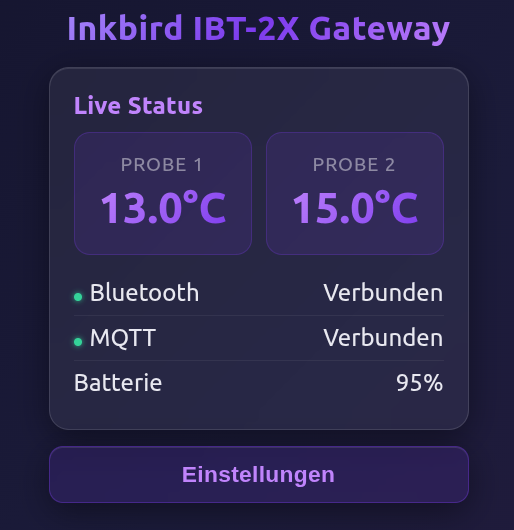
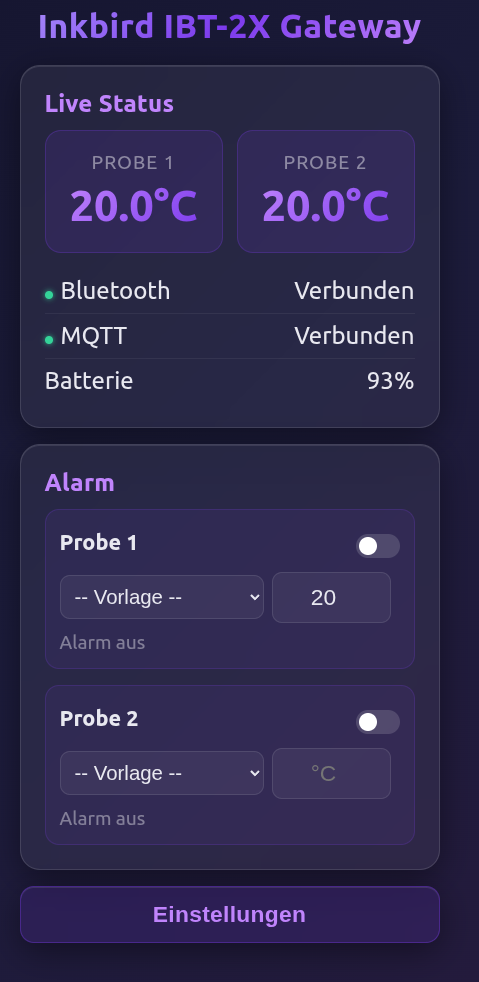
The ESP32 has a built-in web page — just open it in the browser, no app download needed. The interface shows:
Live temperatures: Both probes displayed large and clear, with BLE and MQTT status and thermometer battery level.
Alarm system: Configurable per probe. Enter a target temperature or choose a preset — when reached, you get an alarm directly in the browser.
Temperature presets: 11 pre-set target temperatures for quick selection:
- Pulled Pork (93°C), Chicken (80°C), Pork roast (75°C)
- Steak rare to well-done (48–68°C)
- Salmon (52°C), Bread (85°C), Ham (70°C)
Temperature history: Click on a probe to open a chart with history, min/max values and alarm line. At a glance you can see how stable the smoker temperature is.
Setup: WiFi and MQTT are configured via a settings menu. On first start, the ESP32 opens its own WiFi hotspot for setup.
Home Assistant Integration: Dashboard & Automations
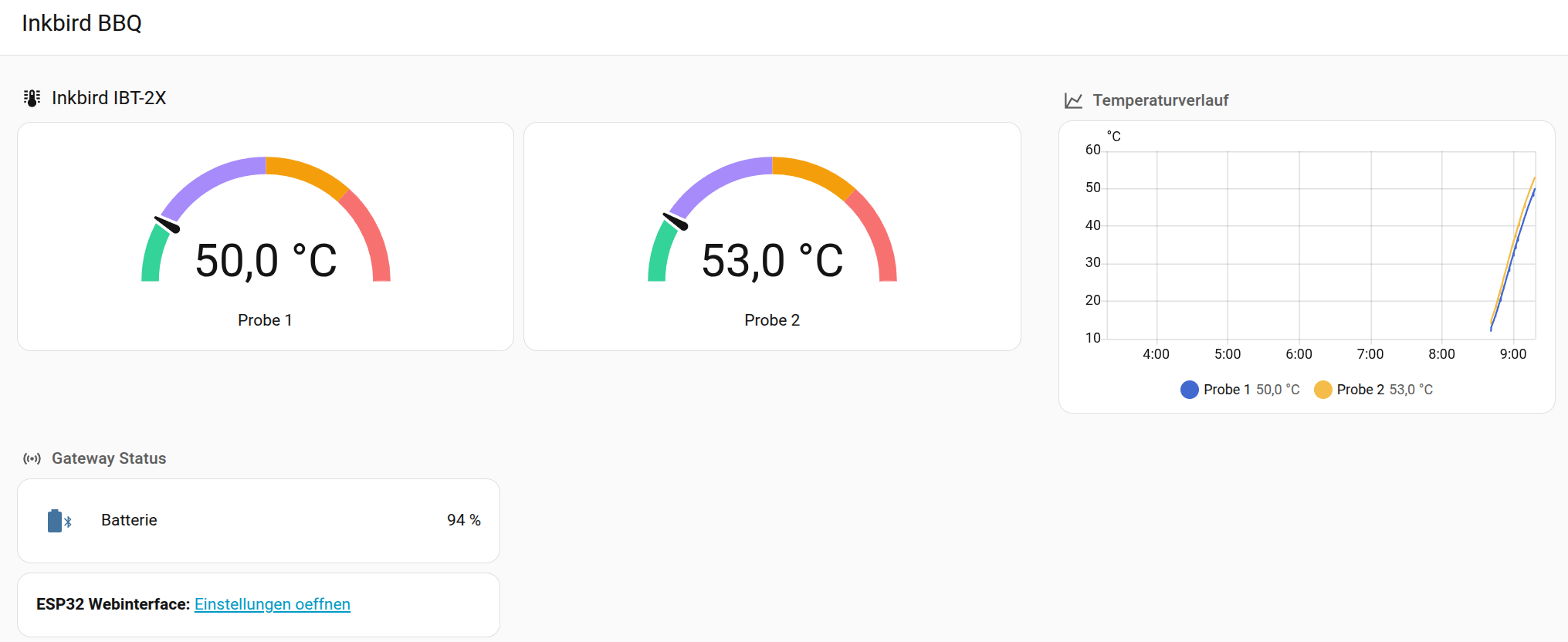
Via MQTT auto-discovery, the sensors automatically appear in Home Assistant — no YAML editing needed. Three entities are created:
- Probe 1 temperature (meat core temperature)
- Probe 2 temperature (chamber)
- Battery of the thermometer
In the Home Assistant dashboard I see temperatures as gauges and a 6-hour history chart. The color scale goes from green (low) through purple and orange to red (>220°C).
The real advantage of Home Assistant: Automations. For example:
- Core temperature above 90°C → Telegram message to phone
- Chamber below 100°C → Warning "Add more charcoal?"
- Battery below 20% → Notification
The original app can't do this — there you only get alarms when the phone is within Bluetooth range and the app is open.
Flutter App: Monitoring Without Home Assistant Too
Not everyone has Home Assistant. That's why there's also an Android app (Flutter) that connects directly to the ESP32 gateway.
What the app does:
- Live temperatures of both probes
- Alarm system with the same presets as the web interface
- Background service: The app monitors temperatures even when minimized. When a probe reaches the target temperature, a system notification fires — even on locked screen.
- Temperature history chart
The background service was important: during long cooks, the phone sits in your pocket for hours. The app still needs to alarm when the meat is done.
Why Not Just Buy a WiFi Thermometer?
Good question. WiFi thermometers exist, but:
Price: A good WiFi thermometer costs €80-150. My BLE thermometer* cost ~€25, the ESP32 is ~€8. Together significantly cheaper.
Flexibility: No WiFi thermometer gives me MQTT, Home Assistant integration, custom Telegram alarms, and a self-programmed app. I'm not tied to any cloud and can extend the system anytime.
Fun of building: Honestly — the project was just fun. BLE reverse engineering, building a web UI, programming a Flutter app. And in the end, the pulled pork tastes better when you know your own tech was monitoring it.
More technical details about this project:
View Project →* Advertising — Links marked with an asterisk (*) are affiliate links. If you purchase through these links, I receive a small commission — the price stays the same for you.

Mike Sobczinski
Trained in automation and computer technology, working full-time in the semiconductor industry. Builds IoT solutions with ESP32, LoRa, and Home Assistant — from firmware to dashboard.
Learn more →